How to use this tool
- Choose a PDF containing photographs or other embedded images.
- Run extraction and review the returned images and dimensions.
- Select useful results and download individual images or an export.
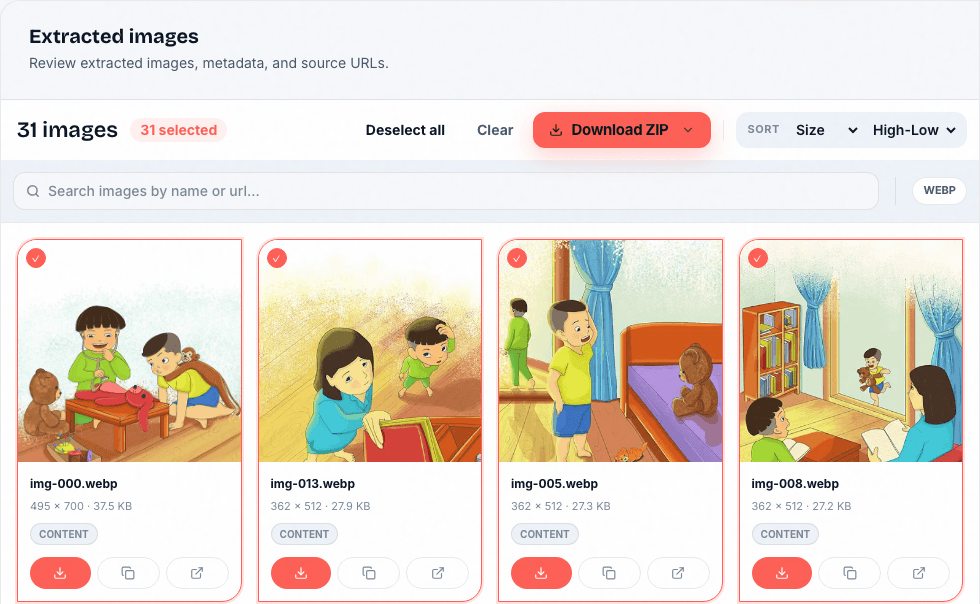
Pictures inside a PDF, not screenshots of every page
A PDF can store photographs, text, vector drawings, and masks separately. This tool finds embedded images; it does not promise a complete image of each page. A scanned page may itself be one large embedded image.
Check colors and image quality before exporting
Document previews and extracted files may be converted during processing. Color spaces, transparency masks, and image fragments can affect the result. Compare important images with the source PDF; extraction does not increase their resolution.
Uploaded processing and temporary results
Your document is uploaded for processing, not processed entirely inside your browser. Uploads and extracted artifacts expire according to the retention policy. Download results promptly and retain the source document.
Questions about this workflow
Is this a PDF-to-JPG converter?
No. A page converter renders text, drawings, and images together. This tool recovers embedded image assets instead.
Why are some charts or logos missing?
A chart or logo may consist of vector paths rather than an embedded raster image. It may not be returned as one complete picture.
Are the files identical to the originals?
Not necessarily. The document engine can decode or convert embedded images. Inspect the returned format, dimensions, and preview before using the output.
Credits, processing, and next steps
Guests have a shared allowance of 5 credits per UTC day: a webpage costs 2 credits and a document costs 1. Account plans have their own allowances. Documents are uploaded for server processing; see the retention policy before uploading sensitive material.